Introducing Offset
I remember using hex editors and apps like Cheat Engine to mess around with games. Find the value for ammunition or health, change it, enjoy having considerably more of it than the developer intended. Simple stuff, and a very satisfying introduction to poking around inside software.
Games have become a lot more sophisticated since then. Anti-cheat systems add another layer of protection, and the game itself can be considerably harder to work out. The number on screen might have several copies in memory. Objects move around. A value you change gets immediately overwritten. Sometimes giving yourself another ten bullets turns into a small research project.
I wanted something powerful enough to work through that complexity, with tools for investigating what was happening after the first search. I also wanted it to be useful to power users and mod makers, while giving someone who just wants to change a few values a sensible place to start.
So I built Offset.
It’s a desktop memory editor and binary-analysis workbench, written in Rust, with a visual trainer builder. You can investigate running software, save what you’ve found in reusable tables, then turn those tables into standalone apps people can run without owning Offset. You can share those apps or sell them.
That gives it a fairly broad audience. You can learn the basics in the built-in practice target, dig into pointers and disassembly yourself, or use a finished game panel somebody else has made. A mod maker can do the investigation and give players controls they understand without asking them to learn memory editing first.
It costs US$69 once, with all future updates included. There’s a lot here that a screenshot of a hex editor won’t tell you.
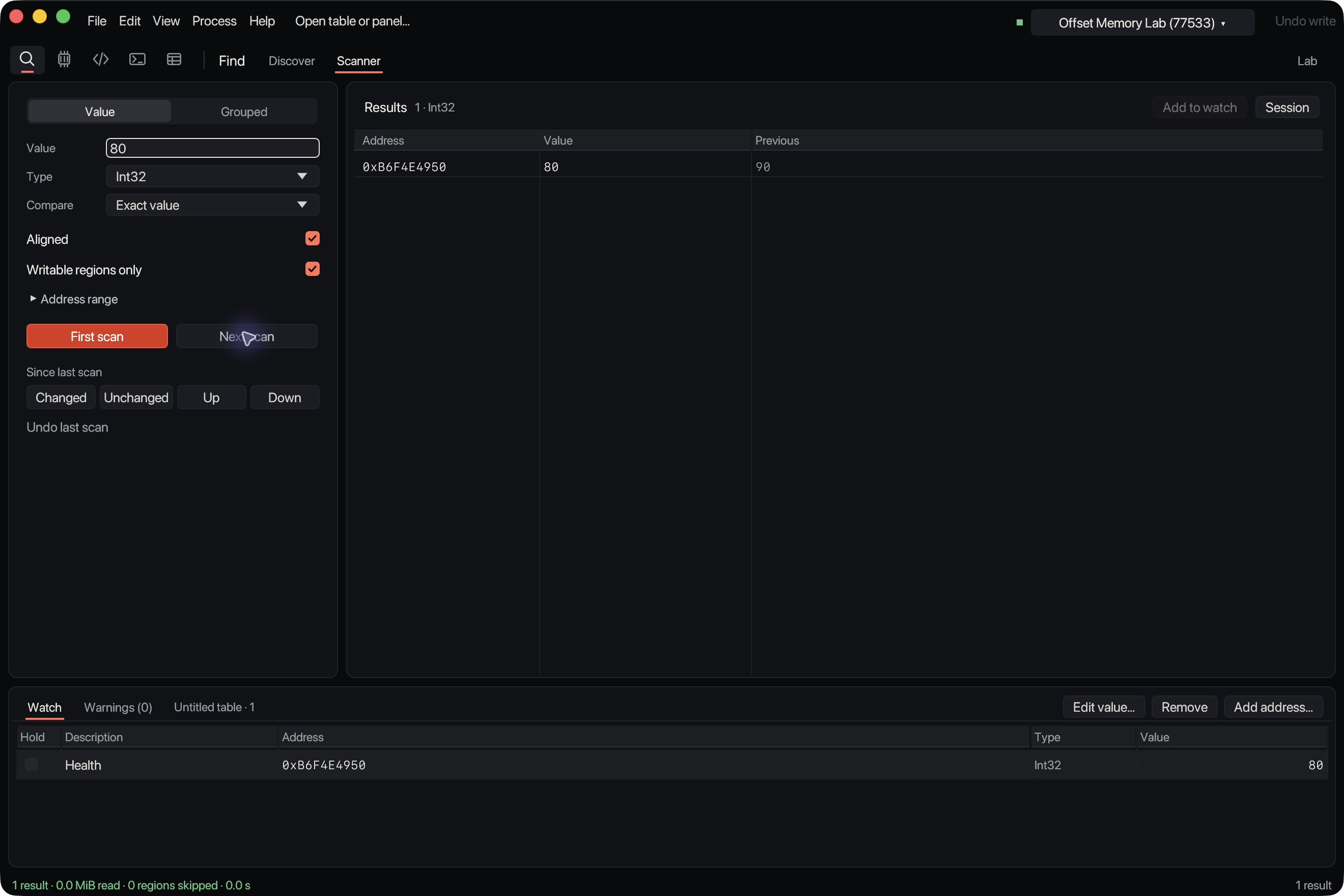
The redesigned workbench running on macOS. This dark interface is a development preview; current customer downloads use the earlier interface. Click any screenshot to open it at full size.
Finding values
If you’ve never edited process memory, the basic idea is fairly easy to follow. Imagine a game showing 100 health. Search its memory for 100 and you’ll probably get a ridiculous number of results. Lots of unrelated things can contain the same number.
Take some damage. Now you’ve got 90 health. Search the previous results for 90. Repeat until you’ve narrowed the candidates down enough to investigate them, then add a promising address to the watch table and try changing it.
Offset has a built-in Memory Lab for learning this. The values belong to the app’s running process, so you can practise scanning, refining and writing without starting with a game you care about. The website has a short recording showing a scan, a value change and Undo. There’s also a browser toy for trying the basic idea before buying anything.
The scanner covers signed and unsigned integers through 64-bit, floating-point values, text and byte patterns with wildcards. You can refine by changed or unchanged values, increases or decreases, ranges and differences. An unknown-value scan gives you somewhere to start when the game shows a health bar instead of a number.
Sometimes you know more than one value. Grouped scans let you search for an exact layout of typed values with fixed gaps between them. Health and ammunition sitting near each other can be a much better clue than either number on its own.
You can save ordinary scans and unknown-value snapshots too. They’ll retain the previous values needed for comparison, and you can resume against the same verified process launch. After that process has gone away, the saved session is still available to inspect, but it doesn’t pretend its addresses belong to the next launch.
Discover approaches the search from the number you can see. It checks supported representations of that value, so you don’t have to keep restarting because you guessed an integer when the game used a float. Change the value in the target, compare again and narrow the candidates down.
That last point sounds small until you’ve spent time arguing with a number that looks perfectly ordinary on screen.
Copies
A game can keep several copies of the same value. One might feed the interface. Another might be cached. Another might be involved in the logic you wanted to change. Finding an address that follows the number on screen doesn’t tell you which job it’s doing.
You edit it, the display changes briefly, then everything snaps back. Or nothing happens at all. Congratulations, you’ve found a number the game feels comfortable ignoring.
Offset has an Investigate copies workflow for this. You select a candidate, review the proposed investigation and get a report about how the tested values behaved. It helps you examine relationships between candidates and see where edits propagate or get overwritten, with restoration and recovery status kept visible.
The point is to give you more evidence to work with when several addresses appear to be the answer.
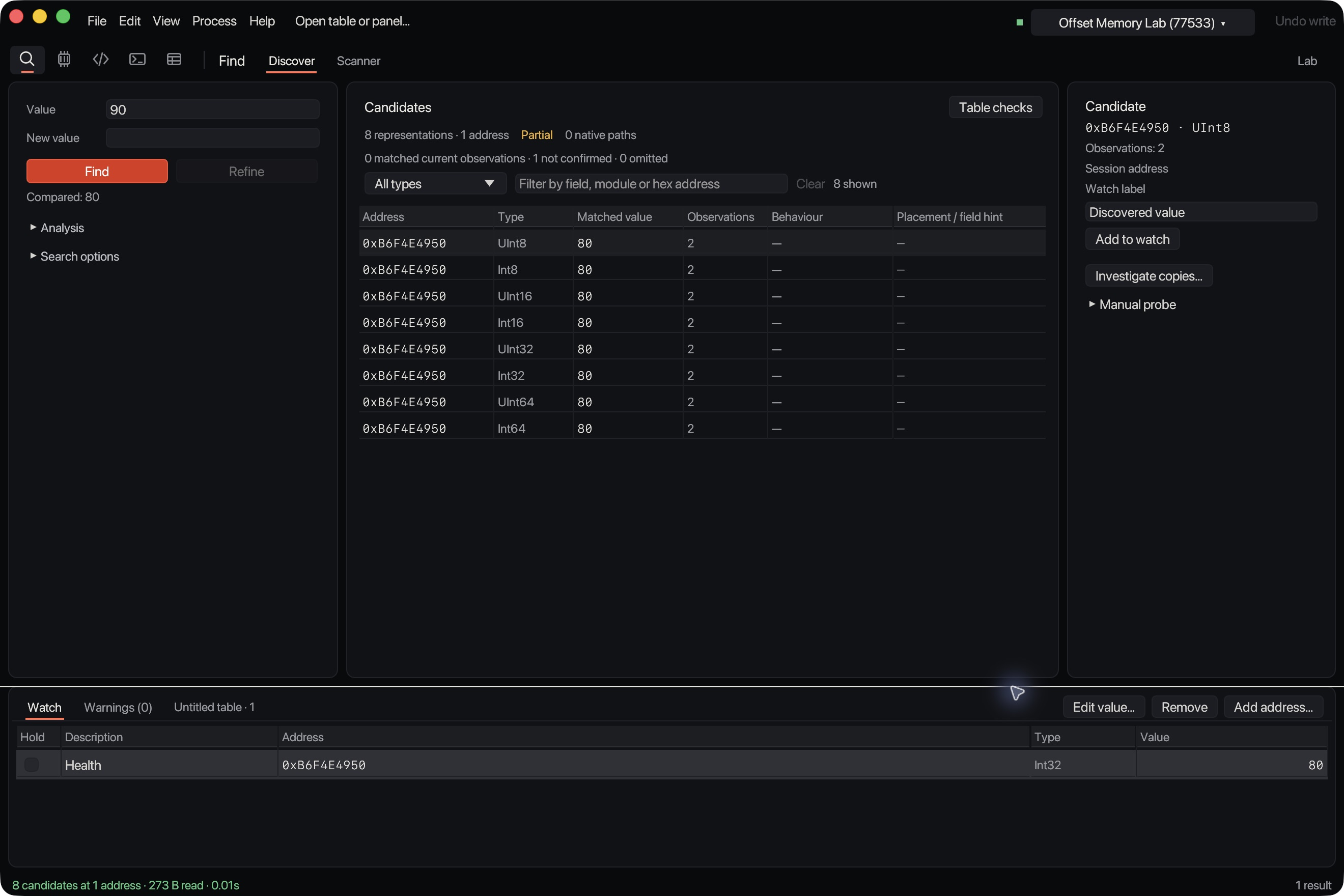
Discover in the macOS development preview. These rows are different representations at one address, not eight independently discovered health values.
The report can be inconclusive. It doesn’t claim to prove which field the application trusts, and restoring the edited bytes can’t reverse every consequence a running game might have produced in response. Those distinctions belong in the tool. Otherwise you end up with a very confident interface helping you reach the wrong conclusion faster.
For me, this is one of the most useful parts of Offset. Searching gets you a set of possibilities. Investigating their behaviour gives you a better basis for deciding what to keep.
Reusable tables
A raw address is usually a short-lived discovery. Restart the game and its objects can move. A table full of yesterday’s addresses is going to have a fairly disappointing morning.
Offset supports module-relative addresses and pointer chains, including 32-bit and 64-bit pointers. There are pointer maps you can capture to disk, search offline and compare across captures, then check the surviving paths against the running target before adding them to a table.
For supported LuaJIT and Unity Mono targets, tables can also use named runtime field paths. That lets a definition resolve a supported field again when objects move. Build checks help refuse definitions when the target has changed, rather than applying an old table with fingers crossed.
Fresh observations can be used to revalidate saved paths after a restart. A game update can still break a table, which is why the game packs name their supported builds. I don’t want someone finding that out after pressing Apply.
Tables preserve the labels and types you’ve worked out, so you can stop remembering what every address meant. You can open a table directly, or open a panel that gives those entries a more useful interface. Declarative CT XML address records can be imported and exported too, with unsupported records reported.
Opening an imported table doesn’t run scripts, attach to a process or switch freeze back on. You choose the target and the actions yourself.
Ordinary writes are read back for verification, and Undo checks the current bytes before restoring the old ones. If the game has changed those bytes since your edit, Offset refuses to blindly put yesterday’s value back. That’s the sort of detail I care about in an app whose entire purpose involves poking other software.
Code and binaries
Once you’ve found something useful, you often want to understand the surrounding memory or the code touching it. Offset has a hex browser, memory maps and structures, alongside disassembly for x86, x64 and ARM64.
There’s also a read-only Binary workspace. You can open PE, ELF and thin Mach-O executables, or explicitly configured raw files, without launching them or attaching to a process. Browse sections and native symbols, move between file offsets and virtual addresses, and inspect the instructions or bytes.
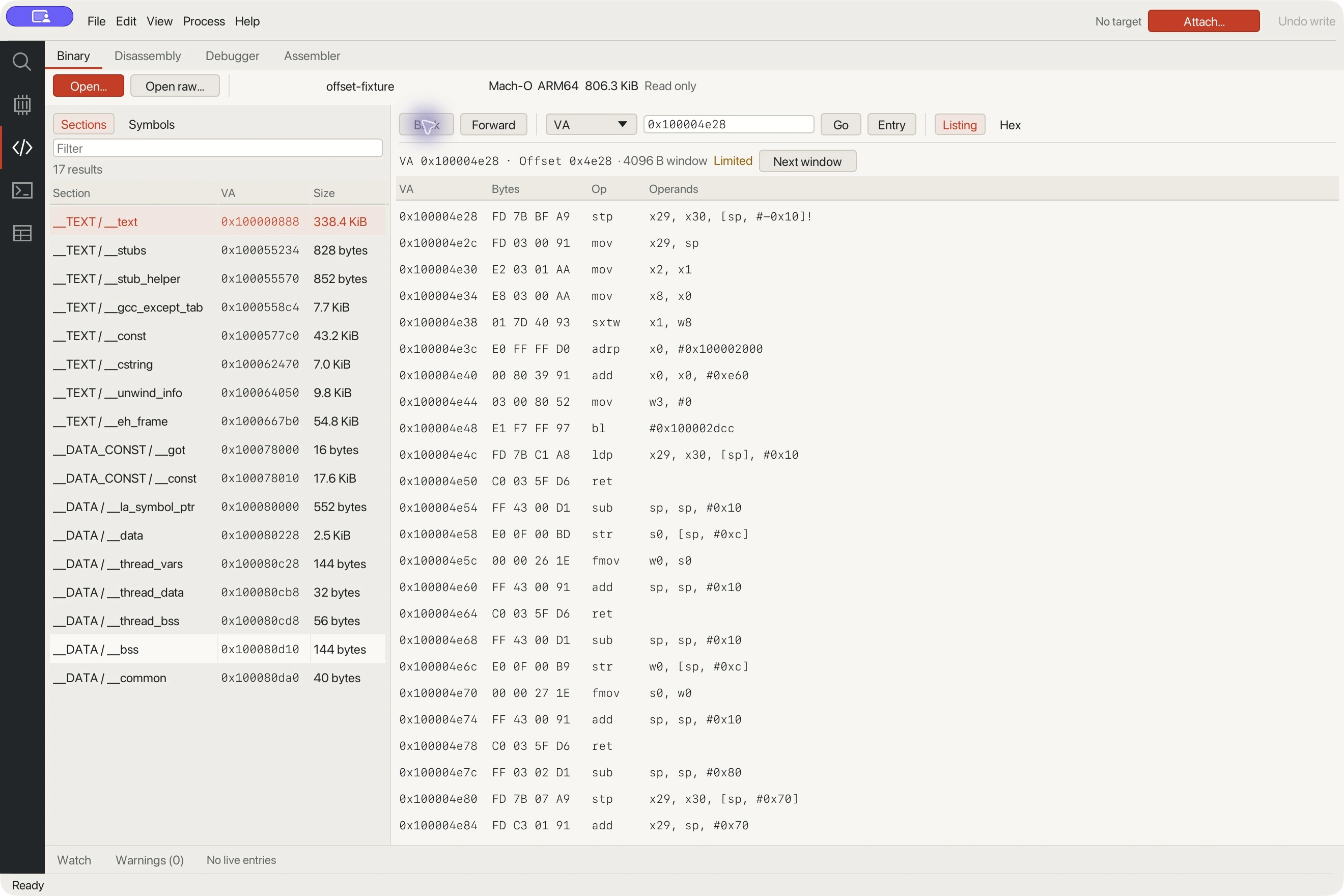
The Binary workspace inspecting Offset’s controlled test executable. This screenshot uses the earlier light interface.
For live work, the assembler lets you preview assembled bytes and apply checked patches. You can deploy an executable block into the target process as well; deploying it doesn’t automatically redirect execution into it. Assembly compilation needs LLVM clang installed.
The debugger connects through a separately installed LLDB adapter. The controlled Apple-silicon checks include watching a value being written and inspecting the stop address and stack. Windows debugger acceptance is still pending, so I’m keeping that claim specific to the platform where it’s been demonstrated.
Lua scripting handles repetitive memory reads and writes. Scripts run with resource limits and without access to your files or the network. Scans, scripts and compiler jobs run away from the UI thread, because a long search shouldn’t make the whole window stop responding.
Windows has additional tools for explicit DLL loading into supported x64 processes and guarded file patching. File patches can be previewed and applied with a recovery backup on a supported local NTFS drive, then exported as a dedicated file patcher. That’s a separate output from a live-memory trainer.
A decompiler isn’t included. Persistent analysis projects and the larger analysis features are further work. There’s already plenty to use here without treating the roadmap as something you receive at checkout.
Trainer builder
This is the part I particularly wanted to get right: taking the work you’ve done and giving somebody an interface they can use.
In the visual builder, you arrange value fields and preset buttons, add headings or explanatory text, and include readouts for current values or status. Controls can take a full row or share one. The preview shows the panel while you’re editing it, without firing actions into the target.
You could make a small panel with health and ammunition controls, or a larger game-specific tool organised around individual units and global actions. The person using it gets labels that describe the controls, rather than a homework assignment involving hexadecimal addresses.
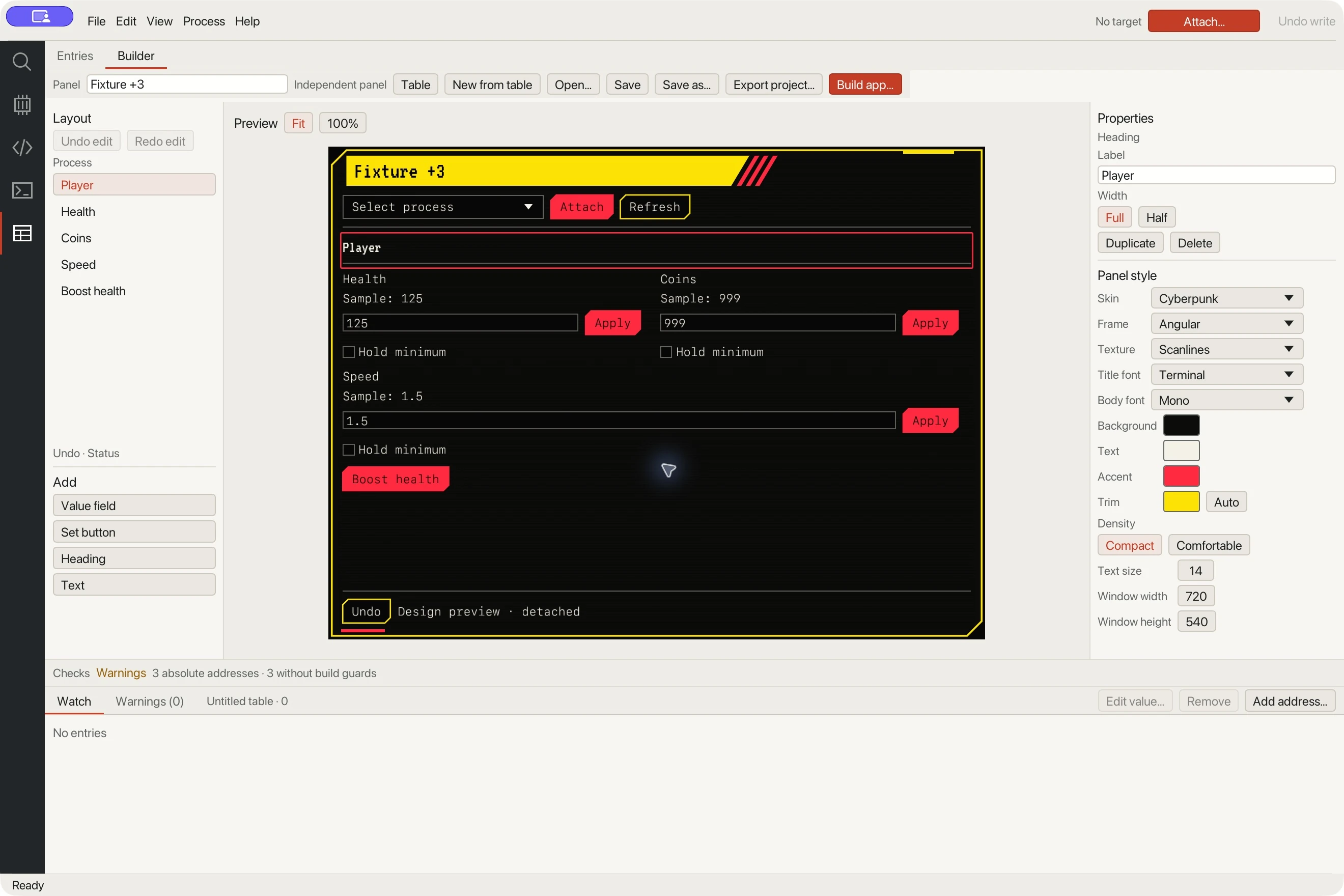
Building a panel against sample test values. The preview is detached and doesn’t write to a target.
There are 15 skins, including Cyberpunk, Windows 95, Classic Mac and Ink. You can change colours, title and body fonts, texture and frame treatment. The bundled pixel, terminal and handwritten fonts travel with the exported trainer.
I refuse to accept that every utility needs to look like an enterprise settings page. Sometimes the appropriate presentation for giving yourself 999 coins is a grey button from 1995.
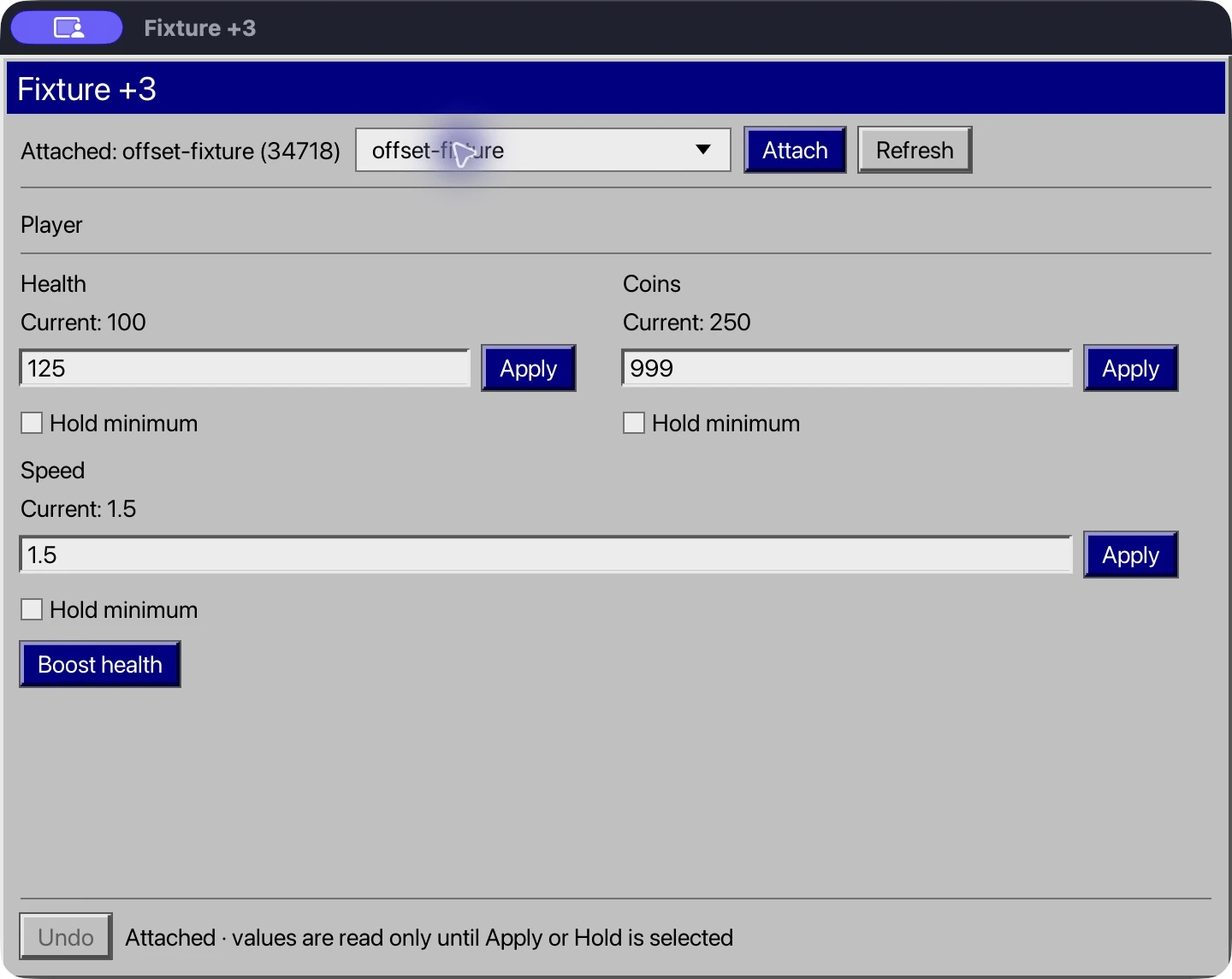
A built standalone trainer attached to Offset’s controlled test process. The Windows 95 appearance is a skin; this capture is from macOS.
Save the panel as an editable project, export it, then build a native macOS app or Windows portable trainer on that operating system. Building needs Rust, native compiler tools and Python for the distribution notices. The person receiving the finished app doesn’t need any of those, or a copy of Offset.
You can share or sell your panels, subject to the target software’s rights. Editable exports include the engine source needed to modify and rebuild that panel under the supplied MIT licence. Offset’s desktop workbench stays proprietary. If you want to distribute a signed or notarised trainer, you’ll need to arrange that signing yourself.
Exports cover supported value controls, minimum holds and guarded Undo. Lua scripts and live executable blocks stay in Offset. The builder uses ordered layouts, so it’s also worth being clear that this isn’t a free-positioned design canvas with arbitrary artwork and sliders.
Being able to hand over a finished app is a substantial part of the appeal. You can do the investigation once, give the useful controls a sensible shape, and let somebody else use them without teaching them the whole process.
Game packs
I’ve also been building versioned control packs, which are included with a purchased copy of Offset at no separate charge. The current library covers four Windows games, and each pack lists the exact game build it supports.
Hospital Director for Two Point Hospital covers individual staff skills, patient needs and equipment, plus hospital-wide actions. It also lets you turn working doctors into props, including bins and vending machines, or make staff tiny or enormous. Apparently running a hospital wasn’t strange enough already.
Island Director for Tropico 6 has controls for construction, owned-building upgrades and progression, alongside camera and game-speed controls. Its World Wonders work went through a more useful test than checking whether a field changed: all 21 catalogue gates became available, then the Great Sphinx was placed and built normally, saved, and checked after a full restart without the companion running. Normal placement and costs still apply.
Monkey Workshop for Bloons TD 6 includes tower paths, free upgrades and selected-unit attributes, with actions for all eligible towers where supported. There are ability cooldown controls, powers and installed Trophy Store catalogue grants too. The Jukebox checks included adding a previously unavailable track through the normal interface and hearing it play in a normal match after restarting without the companion.
Those examples are why I care about testing what the player can use. A changed inventory counter tells you considerably less than selecting the content, using it and checking whether it survives a restart.
Candy Workshop handles supported goals and board changes in Candy Crush Saga, including tiny, giant and sideways boards. It doesn’t provide extra moves, gold or full content access. Each pack has its own limits; the library isn’t a promise of complete control over every game.
Some packs require a matching companion, loaded explicitly. Game commands can also make persistent changes to progression or saves, and ordinary memory Undo can’t reverse a completed game command. The individual pages explain those requirements and the remaining qualifications.
Testing
The dull work behind an app like this matters quite a lot. Correct integer handling, unreadable memory, a process exiting halfway through an operation, an address changing after a restart. You can make a fairly impressive demo while getting all of those wrong.
Offset keeps 64-bit values and addresses precise, bounds retained snapshots and search work, and reports partial coverage. Controlled external-process checks have passed on macOS and Windows. The trainer exports have also been exercised against a separate test process, including edits, holds and guarded restoration.
Game-specific verification goes further where a feature needs it, as with the World Wonders and Jukebox examples. There are still limits recorded separately for individual tools and platforms. A successful build alone doesn’t establish that a control works in a running game.
Windows has floating panel controls and an explicitly enabled in-game menu for compatible DX11 setups. That doesn’t establish support for every renderer or fullscreen mode. Offset doesn’t bypass anti-cheat, and process access on either platform still depends on the operating system and the target’s protections.
I want the evidence behind these features to be as useful as the feature list. If something has only been checked in a controlled target, that’s the scope of the claim.
Pricing
Offset is US$69 once for a lifetime licence, all future updates and five active devices. Applicable tax is shown at checkout. You can deactivate a device to free its slot when changing computers. There isn’t a subscription or a separate analysis edition.
The Mac download supports Apple silicon on macOS 12 or later and is Developer ID signed and notarised. Windows is currently an unsigned x64 portable preview requiring the Microsoft Visual C++ v14 x64 runtime. Intel Mac and Linux downloads aren’t supplied. The published Windows version is 0.1.3; macOS remains on its earlier release, and the redesigned dark workbench shown above is still a development preview.
Activation and periodic licence checks need internet access. The requirements and licence page covers that, along with export permissions and platform requirements. Downloads come with the Lemon Squeezy purchase receipt.
You can get Offset at rawoffset.com. Try the browser scanner, watch the native recordings and have a look through the game packs. If there’s a workflow you want to use it for, email me with the target and what you’re trying to do. I’d like to hear about it.
Comments