WYSIWYG Editors Are Too Expensive, So I Built My Own
It’s 2026 and apparently putting a decent WYSIWYG editor in your application still requires a subscription, a spreadsheet and a conversation about how many times somebody might open the bloody thing.
I don’t understand how a company like TinyMCE can still charge this much for an editor you embed in a web page. I want people to write content in my application without having to budget for how often they do it.
Want revision history? That’s extra. Suggested edits? Another extra. Your users opened the editor more often than expected? Congratulations on the engagement, here’s your bill.
So I built Better Rich Text.
It’s a rich text editor written in TypeScript, with its own document engine, a full interface and adapters for the frameworks people use. US$299 once. Every feature included. Unlimited developers, domains and products, including SaaS.
Versioning is included. So are multiple editors on a page, comments, suggested edits and real-time collaboration. You can import and export Word documents, export PDF and work with Markdown. The plugins are all part of the same licence.
I built it to compete with TinyMCE, CKEditor and Froala, including the features they put in their more expensive plans. I didn’t want to save money on a basic editor and then have to build version history and collaboration myself anyway.
You can try the demos before buying anything.
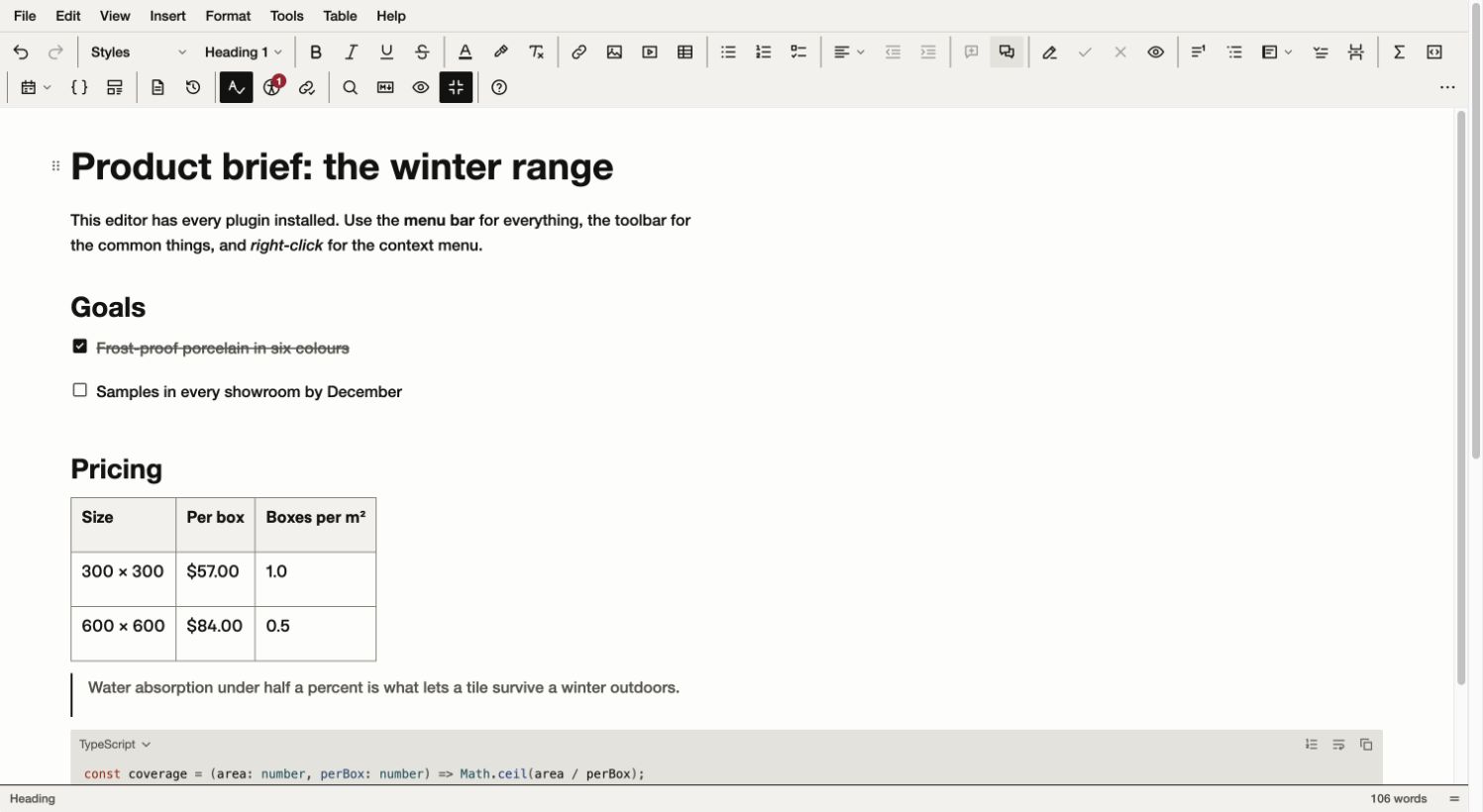
The full editor in the Studio skin, using the demo’s sample product brief. Click either screenshot to open it at full size.
The prices are ridiculous
At the time of writing, TinyMCE’s pricing page lists Essential at US$79 a month, paid annually. Professional is US$145 a month, paid annually. Revision History and Suggested Edits are separate add-ons on Professional, each listed at US$787 a year.
Professional plus those two add-ons comes to US$3,314 a year. That’s before any usage overages. For that money, I’d quite like it to deal with the client feedback too.
CKEditor has its own version of this. Its Professional plan is US$289 a month on annual billing, with the Collaboration add-on another US$249 a month. That add-on covers co-authoring, comments, revision history and track changes. Together, that’s US$538 a month, or US$6,456 a year.
Those are the published prices for those commercial plans, checked on 31 October 2026, in US dollars.
Rich text editing is a pain in the arse. Selections, pasting from Word and undo all need a lot of work, and browsers have their own ideas about how things should behave. I understand paying someone else to deal with that.
I still think these prices are absurd for a lot of the applications developers are building. A small SaaS product might need comments and a way to recover yesterday’s document without spending thousands of dollars a year. An internal tool shouldn’t have to justify its revision history to the finance department.
I’m charging for Better Rich Text too. I wanted a one-off price that includes the features I’d otherwise be paying extra for.
Stop counting my editors
Editor-load billing particularly irritates me.
TinyMCE documents exactly how it works. Each editor instance that initialises counts as a load. Ten editors on one page means ten loads when that page is refreshed, including instances that aren’t visible. Its cloud plans have allowances, with US$40 per additional 1,000 loads.
Imagine a CMS screen with several editable sections. Adding another field means counting another load every time someone opens the page. Now you’ve got a reason to use fewer editors, even if separate fields would make the page easier to use. Apparently opening a form is something we need to do in moderation now.
That feels completely backwards to me. I want developers to put an editor wherever their users need one. If a page needs an introduction, a body and a set of editable descriptions, give it those fields. Don’t make the interface worse because somebody is counting initialisation events.
Better Rich Text doesn’t meter loads. Create as many instances as you need. The multiple editors demo lets you add more editors to the page, each with its own content and toolbar.
Tiny’s load restrictions apply to Tiny Cloud. Its self-hosted open-source editor doesn’t have those limits, subject to its open-source licence. My objection is to what you pay once you need the commercial features I’ve described.
Version history belongs in the editor
People overwrite things. They delete the paragraph they meant to keep. Someone reviews a document and wants to know what changed since the version they approved.
I don’t think being able to recover earlier work should require a more expensive plan and another add-on.
Better Rich Text has manual and automatic snapshots, named versions and comparisons. You can look at changes inline or side by side, then restore an older version. Restoring creates a new revision, so you keep the history of what happened instead of deleting everything after the point you went back to.
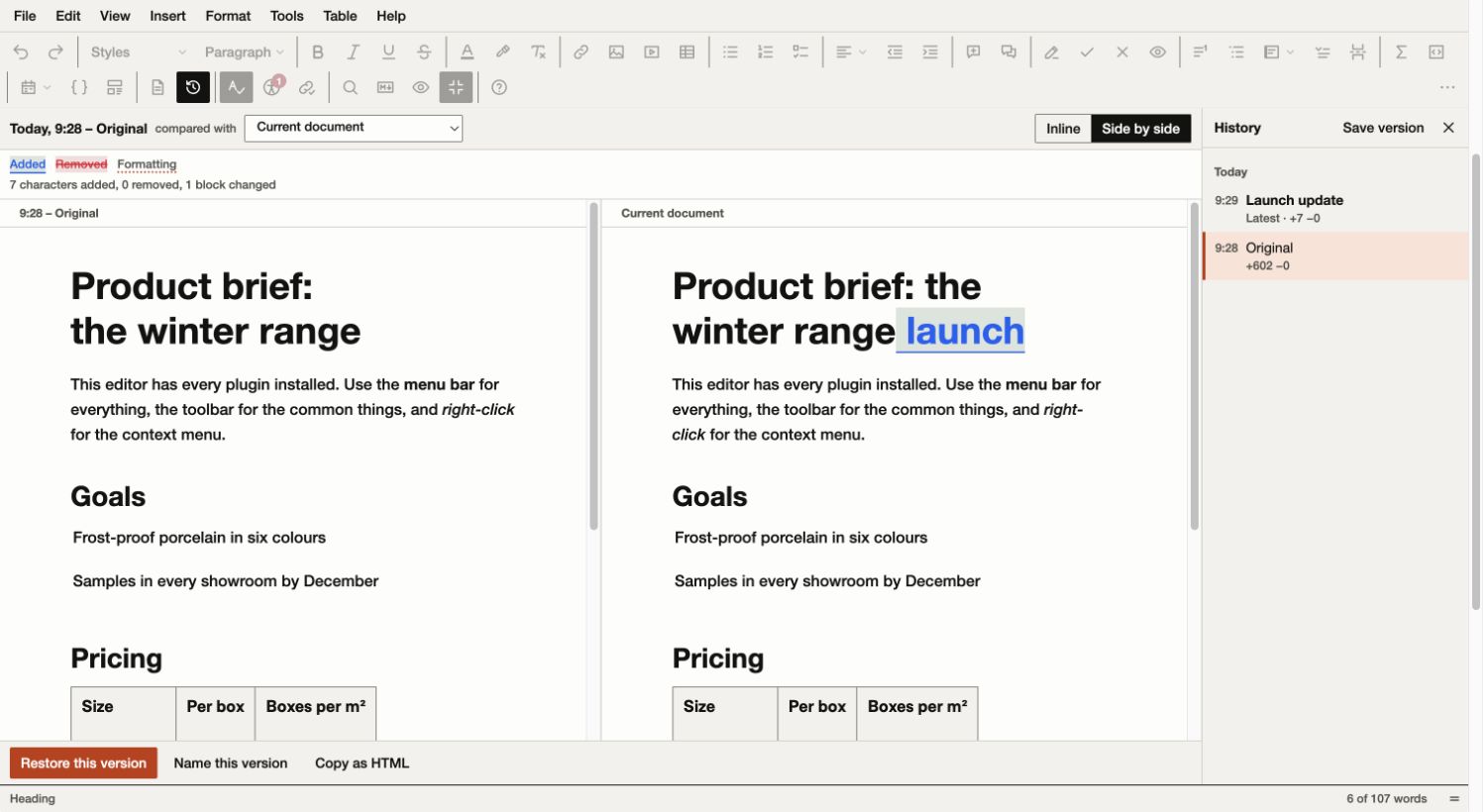
Version history comparing the original demo document with an edited copy. The added word is highlighted, with the saved Launch update version in the history panel and a restore button below.
The storage is yours to choose. There are in-memory and IndexedDB stores, plus an HTTP store for connecting revision history to your backend.
Comments support threads, replies and mentions. Suggested edits let someone propose a change for another person to accept or reject. I’ve included a review demo so you can see the workflow rather than take my word for it.
Real-time collaboration is included too, with presence and support for offline edits that sync when the connection returns. The package includes a Node collaboration server you host and connect to your authentication and storage. You’ll still pay for your own hosting.
The collaboration demo simulates several participants in your browser. It’s useful for seeing carets, selections and reconnect behaviour. The server documentation covers wiring it into an application.
Features
The full editor demo includes the menu bar and plugins, from ordinary formatting through to footnotes and equations. Tables have merged cells, resizable columns and styles, as well as totals that update when values change. Images can be cropped and rotated inside the editor. Code blocks have syntax highlighting.
There are templates and merge tags for repeated content. The email preset includes sample-data previews and exports HTML with styles inlined for email clients. Markdown has its own demo with source and split views, and you can edit content inline on a page if a large boxed editor isn’t the right interface.
Word import and export are included, along with PDF export. I don’t charge per document. There are limits to conversion, especially complex Word layouts and browser-generated PDF. If your work depends on elaborate section headers, unusual embedded objects or accessible tagged PDFs, read the document support guide. I want you to check the documents you use before choosing an editor.
There are accessibility and link checkers, and spelling and grammar integrations. Browser spellcheck works without an external service. You can connect another proofing provider if you need one; any charges from that service are separate.
Ten skins, light and dark themes, and 21 interface languages are included as well. You can change the skin and colours to fit your application.
AI in the browser
I’ve also added an optional on-device AI provider. Chrome has a built-in Prompt API backed by Gemini Nano, which lets websites run an AI model on the user’s device. I hadn’t realised this was available until I started looking into it for the editor.
Better Rich Text can use it for writing actions such as shortening a paragraph or fixing spelling and grammar. The response appears beside the original text for you to review before applying it. You don’t need a provider API key, and the text you’re asking it to work on stays on the device.
There’s also opt-in local proofreading, with spelling and grammar underlines and individual corrections. It checks paragraphs and asks the model for structured correction results, then validates those against the source text before showing them. That helps avoid suggestions being attached to the wrong words. It doesn’t make the model infallible, so you still need to read what it’s suggesting.
The initial model download needs an internet connection. Once the model is downloaded and ready, processing can work offline. Better Rich Text checks availability first and provides download progress and cancellation. Local proofreading starts off; downloading a model doesn’t automatically enable it.
This depends on a supported desktop browser, device and language. Chrome’s current model requirements exclude mobile, and having Chrome installed doesn’t guarantee the model is available. The AI demo lets you select On-device AI and check your browser. The setup guide covers adding it to your application.
If local AI isn’t available or a request fails, it won’t send your text to a cloud provider instead. Cloud models remain an explicit choice. You can connect your own provider through your server and pay its usage charges, but there’s no compulsory AI subscription from me.
Using it
Better Rich Text has its own document model and editing engine. The engine can run without a browser, and the interface sits on top of it. If you want the supplied toolbar, use it. If your application needs a custom editing interface, there’s a headless API.
Features are separate packages, so you can choose what goes into your build. Including everything in the price doesn’t mean forcing everything into your JavaScript bundle.
There are adapters for React, Vue, Angular, Svelte, Solid and Aurelia 2, plus a Web Component.
Once you’ve installed the packages from your download, creating an editor looks like this:
import { createRichTextEditor } from '@better-rich-text/core';

const editor = createRichTextEditor('#editor', {
  content: '<p>Hello</p>',
  onChange: (instance) => save(instance.getHTML()),
});
Here, save is your application’s persistence function. You can also initialise it against a <textarea> and keep that field in sync for form submissions. A plain script-tag build is supplied if you don’t use a bundler.
The plugin API has typed commands and hooks, including filters and actions with priorities and namespaces. If you’ve worked with WordPress hooks, the approach will be familiar. You can use them to change behaviour without forking the editor.
The installation guide explains the download and setup helper. The packages are supplied with your purchase, rather than fetched from a public npm registry. You can keep them in your private repository so your team and CI install the same files.
Pricing
Better Rich Text costs US$299 once. It covers every developer in your organisation and unlimited websites, applications and products. SaaS use is included. There isn’t a more expensive edition waiting for you when you decide to charge your own customers.
For comparison, Froala includes collaboration and version history and doesn’t meter editor loads. Its Professional licence covers one product on three domains and excludes SaaS. SaaS requires Enterprise, currently listed at US$1,999 a year before its October promotional discount. Froala offers perpetual licences too. It has a different billing model from TinyMCE, but it’s still a lot more expensive than what I’m offering.
With Better Rich Text, the licence you buy includes all the features I’ve described. You keep using the versions you receive forever, with every update within the major version you bought included. A future major version may be sold separately, and upgrading is optional.
There’s no runtime licence server or phone-home check. Your key gives you access to downloads and updates, and the software runs in your application.
It’s commercial software, with the terms written out here. You can modify it and ship it inside your products. You can’t republish the packages or sell the editor itself as a competing developer tool.
You can try the demos and check the features you need before buying. The docs cover the setup and limits for each one.
If you’ve got a document or workflow that doesn’t behave properly, send me the details, including what you were trying to do and what happened.
Comments